Sign in to the Gemini CLI with Google and you get a daily quota - Google's quota page lists 1,000 model requests a day on that free tier. Inside the CLI, /stats model shows your usage for the session you're in. Close the terminal and the number goes with it.
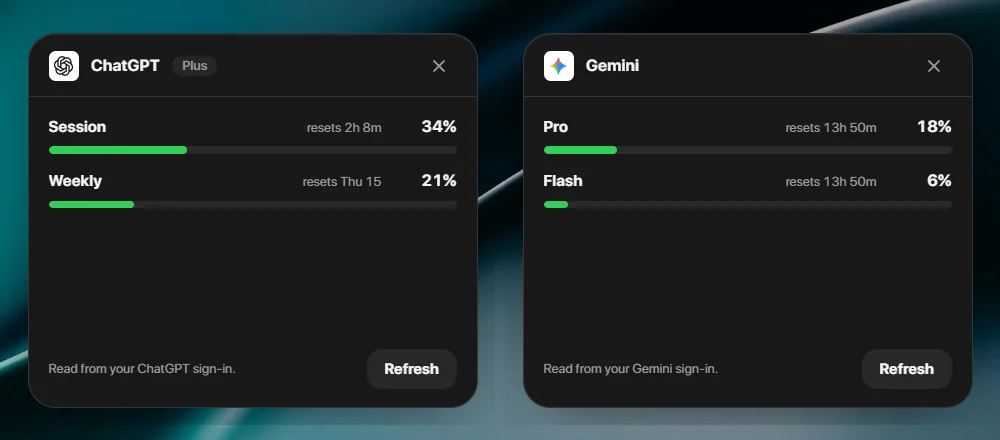
lumabar keeps it on the taskbar instead: how much of your Pro and Flash quota is used, and when each one resets.
What the Gemini tile shows
- Pro - the share of today's Pro quota you've used, and when it resets.
- Flash - the same for Flash.
- Your plan, as Google names it.
When Google reports more than one Pro or Flash model, the tile shows the one closest to its limit - that's the one you'll hit first. Flash Lite is left out: it's the fallback, not the limit anyone watches.
Where the numbers come from
The tile reads the sign-in the Gemini CLI saved on your PC - .gemini\oauth_creds.json in your user folder - and asks Google's quota service the same question the CLI asks. That file is only ever read. When its access token has expired, lumabar gets a fresh one in memory and leaves the file as it was.
Set it up
- Install the Gemini CLI and run gemini once. Choose Login with Google.
- In lumabar, right-click the dock → Widgets… → AI, and add Gemini Usage.
- The numbers appear within a minute and refresh about once a minute after that.
/stats model or a tile?
/stats model is Google's own answer, and it shows more: token counts per model for the session. Use it when you want the detail. The tile answers the one question you'd otherwise open a terminal for - how much is left today, and when does it reset?
If the tile can't connect
- "The Gemini CLI sign-in has expired" - run gemini once in a terminal. The CLI renews its own sign-in, and the tile picks it up on its next refresh.
- Using an API key (GEMINI_API_KEY) instead of a Google sign-in? The tile reads the Google sign-in only, so sign in with Google once.
- Nothing to change inside lumabar - there is no key to paste.
Privacy
The sign-in stays on your PC and is sent only to Google. lumabar has no server, no account and no telemetry. More on how lumabar handles your keys.
Next to your other limits
Gemini rarely runs alone. The same AI group has tiles for Claude, ChatGPT (Codex), Grok, DeepSeek and GLM - see the Claude usage widget for Windows - and the rest of the dock can hold your todos, a pomodoro timer and CPU while a model runs. See every widget.